Ethernet Frames
Ethernet Frame Standards
An Ethernet Frame is preceded by a preamble and start frame delimiter (SFD). These two are not part of the Ethernet Frame but are added by the data link layer.
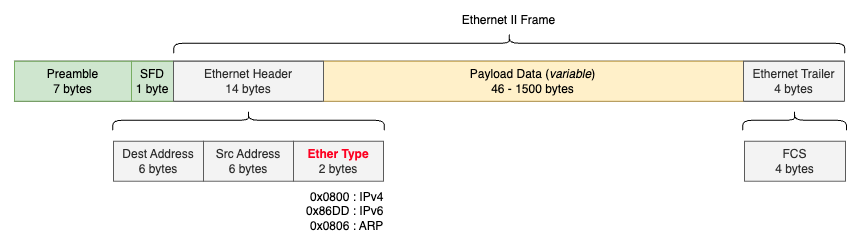
There are multiple Ethernet frame standards in use today. The most common are Ethernet II and IEEE 802.3. While they are quite similar, Ethernet II is by far the most widely adopted.
Ethernet II (a.k.a DIX Ethernet) - Developed by DEC, Intel and Xerox before IEEE standardized Ethernet
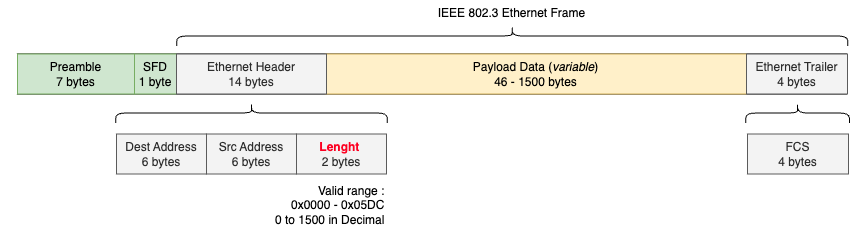
IEEE 802.3 (original, 1983) - The first official IEEE standard for Ethernet
In the Ethernet II standard, the meaning of the EtherType field is straightforward: it identifies the upper-layer protocol encapsulated in the payload of the Frame (e.g., IPv4, IPv6, ARP).
Since both standards can coexist, the distinction is made based on this field’s value:
- If the value is ≤
0x05DC(1500), the frame is IEEE 802.3. - If the value is ≥
0x0600(1536), the frame is Ethernet II. - Values between
0x05DDand0x05FF(1501–1535) are undefined, a historical choice from IEEE to clearly separate the two standards.
Here is an Ethernet Frame captured on my network and displayed with Wireshark:

We can see that it’s an Ethernet II frame thanks to the “Type” field containing 0x0800, meaning I’m using the IPv4 upper-layer protocol.
802.1Q VLAN Tagging (optional)
In 1998, the IEEE 802.1Q standard added support for VLAN tagging in Ethernet frames. When an Ethernet frame enters a VLAN-aware part of the network, a VLAN tag is inserted to indicate its VLAN membership.
If a frame enters the VLAN-aware network without a VLAN tag, it is assumed to belong to the native VLAN.
802.1Q inserts a 4-byte field immediately after the Source MAC address and before the EtherType/Length field in the original Ethernet frame.
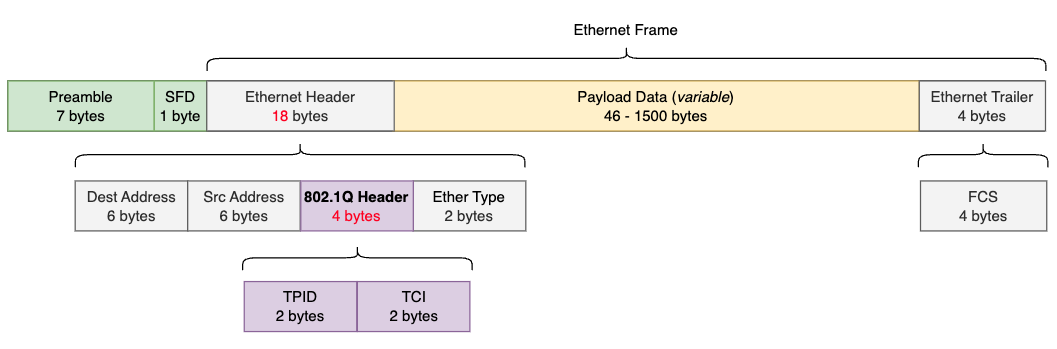
- Tag Protocol Identifier (TPID): Always
0x8100, indicates “This is a VLAN-tagged frame”. - Tag Control Information (TCI): Contains the following sub-fields:
- Priority Code Point (PCP): Used for QoS, mapping the IEEE 802.1p priority classes.
- Drop Eligible Indicator (DEI): Signals whether a frame can be dropped in case of congestion; almost always set to
0in Ethernet environments. - VLAN Identifier (VID): Assigns the frame to a VLAN from 1 to 4094.
0= priority-only and4095= reserved.
Because of this header addition, the maximum Ethernet frame size grew from 1518 bytes to 1522 bytes, what we call a “Baby Jumbo” Ethernet frame.
At the time, not all vendors supported this change, since many devices used a hard-coded limit of 1518 bytes and dropped any larger frame.
Then, in 2006, an IEEE study group released the 802.3as amendment to officially extend Ethernet frame size support up to 2000 bytes, providing 482 bytes more for additional headers and options such as 802.1Q, Q-in-Q, Ethernet OAM, or MACsec.
Ethernet Frames MTU
The standard MTU value configured on network device interfaces is 1500 bytes. When looking at switches, this value is often referred to as “MTU” under the interface details, like:
catalyst_switch#show interface GigabitEthernet1/0/25
GigabitEthernet1/0/25 is up, line protocol is up (connected)
  Hardware is Gigabit Ethernet, address is f003.bc3d.e999 (bia f003.bc3d.e999)
  Description: END-DEVICE
  MTU 1500-byte, BW 1000000 Kbit/sec, DLY 10 usec,
     reliability 255/255, txload 1/255, rxload 1/255
This 1500-byte ‘MTU’ value means the switch interface will accept Ethernet frames with a payload up to 1500 bytes, regardless of what’s inside (IP, ARP, IPv6…).
Anything above gets dropped and increments the ‘giants’ counter. Since the switch never inspects L3, there’s no fragmentation happening at this layer, it’s a pure frame-size gate.
When the payload happens to be an IP packet, this 1500-byte limit coincides exactly with what routers call the ‘IP MTU’ or ‘L3 MTU’.
It is important to understand that the switch interface MTU value (1500 bytes) refers only to the Ethernet payload (which, for IP traffic, is the full IP packet) and not to the Ethernet payload + the Ethernet Header and Trailer (sometimes called together ‘L2 MTU’ or ‘Frame MTU’).
Here is an example of an Ethernet Frame that contains an IP Packet encapsulating an ICMP echo-request:
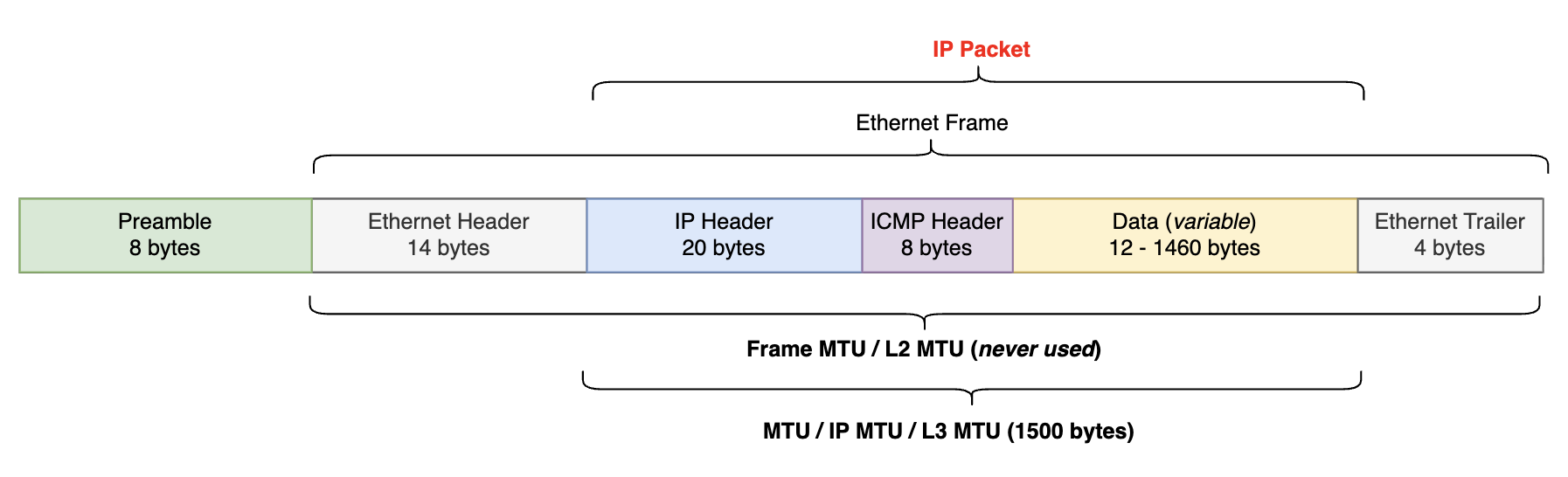
My laptop NIC (Network Interface Card) has an MTU of 1500 bytes. To send an ICMP packet to another host on my network without fragmentation, the ICMP data must not exceed:
$$\text{MTU} - \text{IP header} - \text{ICMP header} = 1500 - 20 - 8 = 1472\text{ bytes}$$
max@Mac ZEROSIGNAL % ping 192.168.0.254 -s 1472 -D
PING 192.168.0.254 (192.168.0.254): 1472 data bytes
1480 bytes from 192.168.0.254: icmp_seq=0 ttl=64 time=12.247 ms
1480 bytes from 192.168.0.254: icmp_seq=1 ttl=64 time=9.686 ms
1480 bytes from 192.168.0.254: icmp_seq=2 ttl=64 time=9.713 ms
1480 bytes from 192.168.0.254: icmp_seq=3 ttl=64 time=9.236 ms

--- 192.168.0.254 ping statistics ---
4 packets transmitted, 4 packets received, 0.0% packet loss
round-trip min/avg/max/stddev = 9.236/10.221/12.247/1.185 ms
Here is the Wireshark capture:

Close-up look at the first echo-request, frame #36:
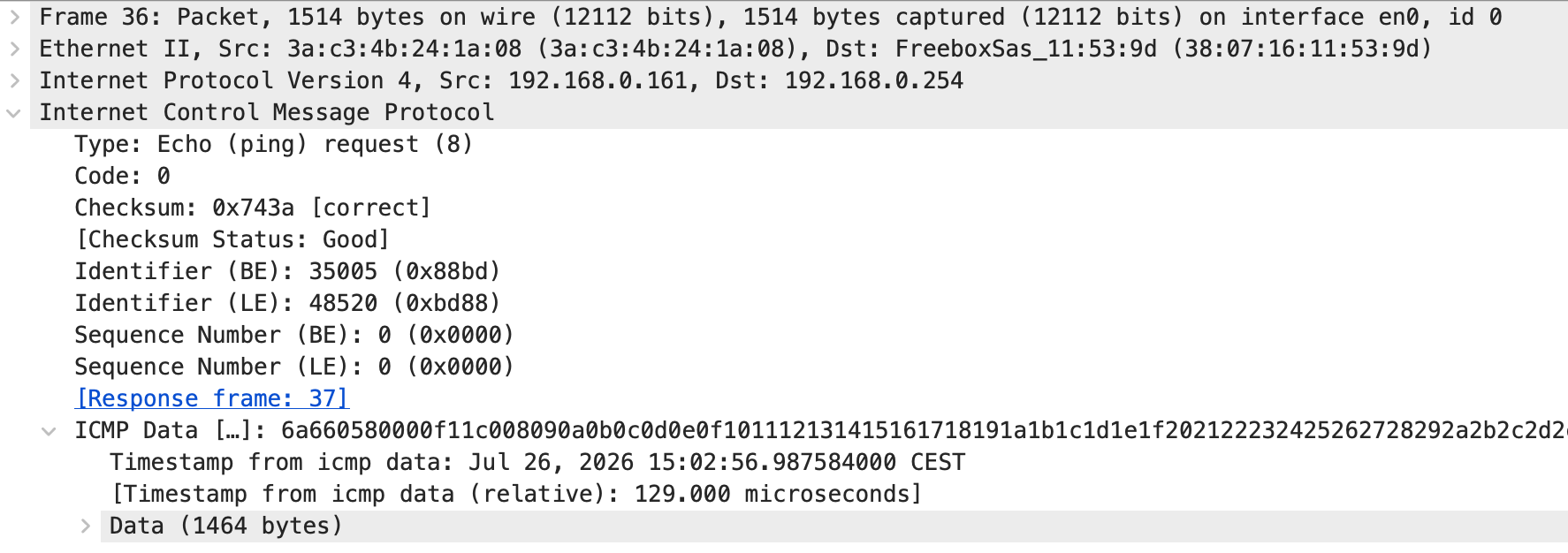
Let’s confirm the numbers add up. The -s 1472 option sets the ICMP data field to 1472 bytes, made of an 8-byte timestamp at the beginning followed by the actual data:
$$8\text{ (timestamp)} + 1464\text{ (data)} = 1472\text{ bytes}$$
Adding the 8-byte ICMP header and the 20-byte IP header gives the full IP packet:
$$20\text{ (IP header)} + 8\text{ (ICMP header)} + 1472\text{ (ICMP data)} = 1500\text{ bytes}$$
The NIC then adds the 14-byte Ethernet Header, that’s the ‘Frame length’ reported by Wireshark:
$$1500\text{ (IP packet)} + 14\text{ (Ethernet header)} = 1514\text{ bytes}$$
We don’t see the 4-byte Ethernet Trailer (FCS) here, it would bring the total to 1518 bytes because of the way the capture is done. We can only see it using a TAP capture.
Let’s see what would happen if the ICMP data went above 1472 bytes with the Don’t Fragment (DF) bit set:
max@Mac ZEROSIGNAL % ping 192.168.0.254 -s 1473 -D
PING 192.168.0.254 (192.168.0.254): 1473 data bytes
ping: sendto: Message too long
ping: sendto: Message too long
Request timeout for icmp_seq 0
ping: sendto: Message too long
Request timeout for icmp_seq 1
ping: sendto: Message too long
Request timeout for icmp_seq 2

--- 192.168.0.254 ping statistics ---
4 packets transmitted, 0 packets received, 100.0% packet loss
The message clearly says there is too much data: the frame is dropped at the NIC level. If we want to send a payload larger than the MTU across the network, we need to use fragmentation.
Jumbo Frames
As each Ethernet frame must be processed as it passes through the network, processing the contents of a single large frame is preferable to processing the same content broken up into smaller frames, as this makes better use of available CPU time by reducing interrupts. This also minimizes the overhead byte count and reduces the number of frames needing to be processed.
Introducing “Jumbo Frames”, a Jumbo Frame is an Ethernet Frame with a payload greater than the standard 1500 bytes. They are not officially defined in the IEEE 802.3 standard, so vendor support may vary, as well as their maximum payload size. The most common Jumbo Frame payload size is 9000 bytes.

A single 9000-byte jumbo frame can replace six 1500-byte standard frames, reducing the total number of frames by five and lowering CPU usage across the network.
Jumbo frames are commonly used in data centers to accelerate large file transfers. The main downside is that the entire network segment must support jumbo frames to avoid fragmentation or dropped packets.
Today, most Ethernet equipment can handle jumbo frames up to 9216 bytes.
Runt Frames
An Ethernet runt frame is an Ethernet frame smaller than the minimum legal size for Ethernet:
$$46\text{ (payload)} + 18\text{ (header + trailer)} = 64\text{ bytes}$$
If you want to find out why we have a 64-byte minimum length for Ethernet frames, feel free to read this post.
Sources
- Ethernet standards: https://en.wikipedia.org/wiki/Ethernet_frame
- Jumbo Frames: https://www.techtarget.com/searchnetworking/definition/jumbo-frames?ref=packetcoders.io
- Jumbo Frames: https://en.wikipedia.org/wiki/Jumbo_frame